You ask your customers to leave a review on Google, they say "yes, of course!"… and then nothing happens. Not because they don't want to, but because finding the review form takes too long.
The solution: a QR code that takes them directly to your Google review form. One scan, and it's done.
Here is how to get it in 2 minutes, for free.
📎 Get your Google review QR Code
Google allows you to download a QR Code directly as an image from your Google Business Profile.
To find it:
- Log in to your Google Business Profile.
- Click on "Read reviews" (or "View reviews") in the dashboard.
- In the top right, click on "Get more reviews".
- Google will show the QR Code and explain how to save the image. Save it.
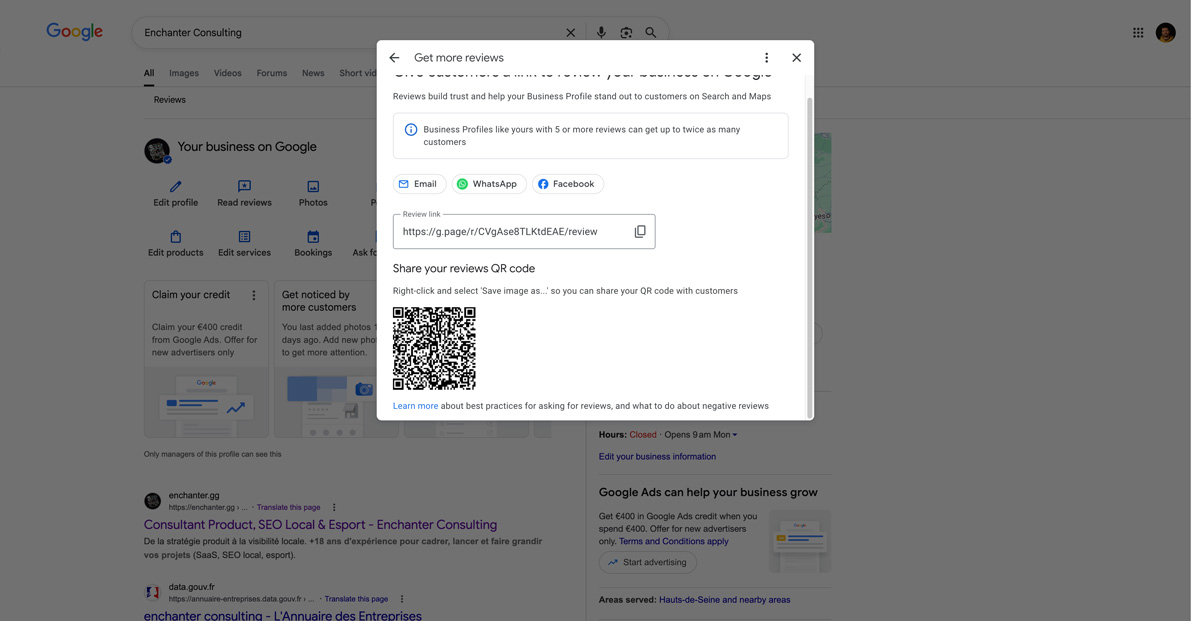
Tip: Google also gives you the direct link to your review form. It can be sent via SMS, email, or integrated into your website. The QR code is just an additional way to distribute it.
🖨️ Place the QR Code where your customers will see it
A QR code is useless if it stays in a folder on your computer.
The idea is to ask your customer for a review at the moment they are most satisfied. As we explain in our article on tips for collecting reviews, timing makes all the difference.
Here are the best places depending on your activity:
- On your counter or checkout: a small stand with the QR code and the phrase "Your opinion matters, scan here!".
- On your business cards: on the back, with a simple mention.
- On your invoices or quotes: at the bottom of the page, discreet but visible.
- On a window sticker: ideal for local shops.
- In a thank-you email or SMS: after the service, accompanied by the direct link.
⚠️ Two mistakes to avoid
Only ask for reviews from satisfied customers. Google prohibits "review gating," which is the practice of filtering your customers to only solicit positive reviews. Your QR code must be accessible to everyone. Besides, a few 4-star reviews among your 5-star ones make your profile more credible.
Don't offer anything in exchange. No discounts, no gifts, no free coffee for a review. This goes against Google's policies on user-contributed content and can lead to your reviews, or even your profile, being removed.
Take action
You now have your QR code. All that's left is to print it and place it in the right spot. It's one of the simplest and most effective ways to grow your review count regularly.
And to see if your efforts are paying off, Begonia.pro allows you to track the progress of your reviews and compare yourself with your competitors.