An unfair, fake, or defamatory review has just appeared on your Google listing. Your first instinct: look for the "Delete" button. Except this button doesn't exist.
However, you are not powerless. Google has a procedure in place to report and remove reviews that violate its policies. You just need to know which ones are affected, how to proceed, and, most importantly, what to do in the meantime.
🔍 Which Google reviews can be removed?
First thing to know: Google does not remove a review simply because it's negative. A dissatisfied customer has the right to share their experience, even if their comment seems exaggerated or unfair to you.
However, Google removes reviews that violate its user-generated content policy. Here are the main categories:
- Spam and fake reviews: Reviews left by people who have never visited your business, coordinated review campaigns, or reviews posted in exchange for compensation (discount, gift...).
- Conflict of interest: Reviews posted by a competitor, a disgruntled former employee, or someone with a financial interest in your business.
- Off-topic content: The comment does not talk about the experience at your location. For example, a review that criticizes your political stance or mentions services you don't offer.
- Hate speech or harassment: Insults, discrimination, threats, or personal attacks targeting a member of your team.
- Personal information: A review that discloses private data (phone number, home address...).
- Misleading content: False criminal allegations, medical or financial misinformation presented as fact.
According to BrightLocal, 71% of consumers check Google reviews before using a business. A single fake review can therefore have a real impact on your revenue.
Good to know: Google removed or blocked more than 240 million reviews in 2024 for violating its rules, a 40% increase compared to 2023. Its detection systems improve every year.
📋 The step-by-step procedure to report a review
Here is how to do it, step by step.
Step 1: Identify the violation
Before reporting, read the review calmly and identify exactly which Google rule it breaks. A review saying "Average service, I waited 30 minutes" doesn't break any rules, even if it annoys you. However, "This company is a scam, don't trust them" with no actual customer experience is potentially a fake review.
Step 2: Report the review from your profile
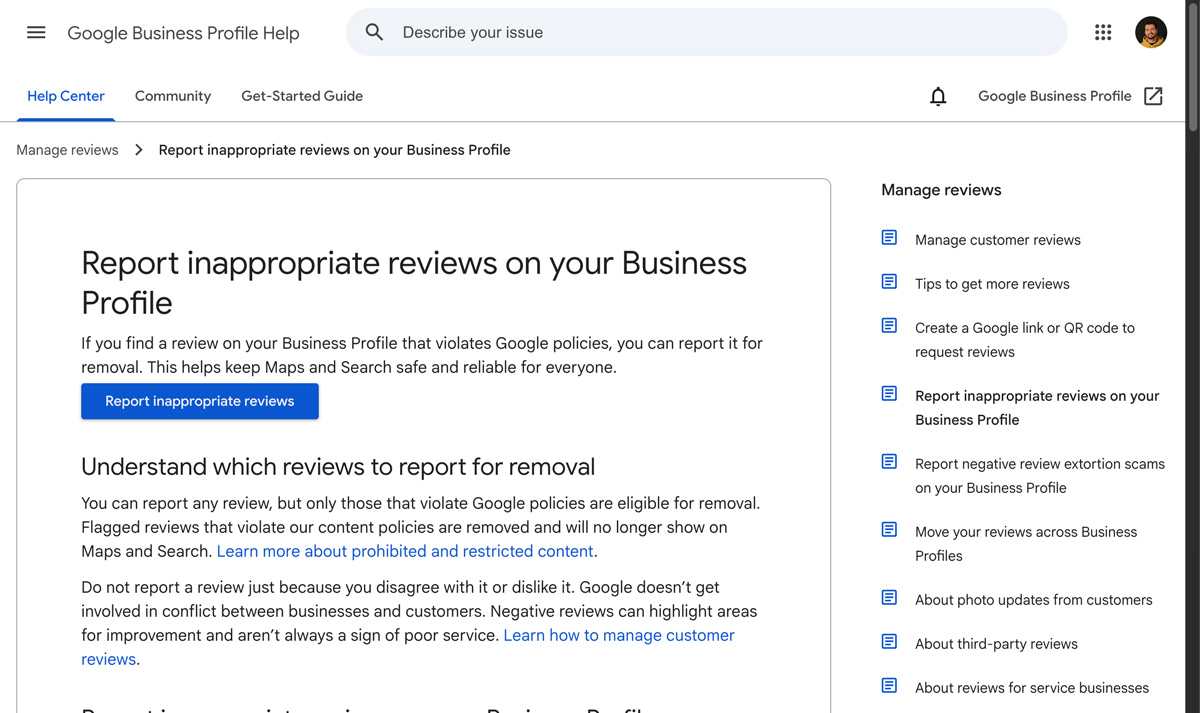
Google has documented the official procedure to report an inappropriate review. Practically:
- Log in to your Google Business Profile.
- Go to the Reviews tab.
- Find the review in question and click on the three dots next to it.
- Select "Report review".
- Choose the violation category that best fits.
Google processes most reports within 3 business days. You will receive an email notification with the decision.
Step 3: Appeal if the report is rejected
If Google rejects your report (which often happens on the first try), you have one chance to appeal. This is where everything plays out.
To appeal:
- Return to your reviews management tool.
- Look for the "Appeal eligible reviews" option at the bottom of the page.
- Provide detailed proof and cite the exact rule that was violated.
As local visibility specialists remind us: don't be vague in your appeal. Quote Google's exact policy, provide screenshots if possible, and check if the review violates multiple rules at once — a multi-criteria case has a better chance of succeeding.
Important: You only get one appeal per review. Take the time to build a strong case before submitting it.
Step 4: As a last resort, escalate
If the appeal also fails, you can post your case on the Google Business Profile Community Forum, including your Case ID. Certified volunteer Product Experts can review your situation and potentially escalate the case.
🛡️ Special case: A coordinated review attack
Sometimes a malicious competitor or disgruntled internet user mobilizes their network to flood you with negative fake reviews. This is called "review bombing."
If you suddenly receive 5 or 10 negative reviews in a few hours when this isn't your usual pace, here's what to do:
- Document everything: Take screenshots of each review with the date and time.
- Report in bulk: From the review management tool, you can select up to 10 reviews and report them together. Bulk reporting generally has a better success rate than individual reports.
- Gather proof: Social media posts calling for bad reviews against you, blackmail messages, suspicious profiles with no history...
An important point to remember: Google can remove reviews retroactively, sometimes months or years after publication, as its detection systems improve. If a report fails today, it might succeed tomorrow. So keep your proof even after an initial rejection.
💬 While waiting for removal: (always) respond
Whether the review is fake or just negative, always respond to it. Why? Because your response isn't really for the review's author. It's for the dozens of future customers who will read that comment.
Here are the golden rules:
For a review you reported as fake:
Hello, we have no record of your visit to our establishment. If you think this is a mistake, please contact us directly at phone/email. We have reported this review to Google.
For a legitimate negative review:
Thank you for your feedback. We are sorry your experience did not meet expectations. Briefly describe what you are doing to fix the problem. Please feel free to contact us so we can make things right.
The important thing is to stay calm, professional, and brief. Don't justify yourself in 15 lines, and never respond emotionally.
Responding to your reviews is also a strong signal to Google: it shows you are an active, attentive professional. If you want to go further, we've detailed 3 tips to get more Google reviews easily.
⚖️ What the law says (and doesn't say)
In France, online defamation is punishable: if a review contains defamatory statements (false accusations presented as facts), you can theoretically take legal action. In practice, it's long, expensive, and rarely proportionate for a single review.
In the United States, the FTC strengthened its rules in 2024 with the Consumer Review Rule: companies that publish or buy fake reviews now face fines of up to $53,088 per fake review. A strong signal showing that platforms and regulators are taking the issue increasingly seriously.
Pragmatic advice: The legal route remains a last resort. In the vast majority of cases, Google's reporting procedure combined with a good response strategy is enough to solve the problem.
✅ The best defense: collect positive reviews regularly
You won't always be able to remove an unfair review. Google isn't perfect, and some fake reviews slip through the cracks.
The real long-term solution is to drown out the bad reviews under a wave of genuine good reviews. If you have 3 reviews and 1 is negative, the impact is devastating. If you have 80 reviews and 2 are negative, their weight becomes negligible.
As we explain in our article on the right pace for collecting reviews, consistency is what matters, not the total number. Three new reviews a month is better than 30 all at once followed by a long silence.
A few simple habits to implement:
- Ask for a review from every satisfied customer, at the right time (right after the service).
- Make the process easier with a QR code or a direct link to your review form.
- Respond to every review, positive or negative. It's the ultimate proof of an active business.
What to remember
- Only reviews that violate Google's policies can be removed. A negative but sincere review will not be taken down.
- Report via your Business Profile, then appeal with a strong case if the report is rejected.
- Always respond, even to unfair reviews. Your response speaks to your future customers.
- Collect reviews regularly to dilute the impact of negative comments.
- Monitor your online reputation to react quickly to suspicious reviews.
Monitor your reviews with Begonia.pro
Begonia.pro allows you to track your reviews and your competitors' reviews at a glance. You know exactly where you stand, and you can react before a bad review causes damage.
➡️ Monitor my reviews and my competitors' reviews
Sources
- Google – Report inappropriate reviews on your Business Profile — official reporting and appeal procedure.
- Google – Prohibited and restricted content (Maps) — official Google rules on reviews.
- BrightLocal – How to Remove Google Reviews — guide updated in February 2026.